


Mastering
I export one track at the end of the mixing process and then import it into a new project for mastering.
Mastering, for me, means preparing the track for whatever purpose it is intended. This means the track will go through different processing steps depending on whether it is intended for cinema, video games, TV movie, trailer, or library music.
Generally, trailer and library music will require your track not to have a big dynamic range. That doesn’t mean it has to sound loud all the time. But make sure that there is not such a dynamic range that you have to turn up the volume in order to hear the softer parts. Have you ever experienced listening to classical music in your car and having to turn up the volume to hear those pianissimo parts? As this is desirable in the concert hall environment and to an equal or lesser degree within a film, you will want to avoid this for trailer and library music tracks.
But, remember, mastering is about doing subtle things. Do not apply a lot of compression or you will lose dynamics and will create distortion.
If the track is intended for TV, movies, theatre or video game cinematics, then you need to keep the larger dynamic range.
You can compress the louder parts some, but if you designed the track so it was soft for dialogue moments and then louder for a chase scene, it makes no sense to level volumes up and then find that the music is now too loud for the dialogue. If the music is too loud in any one place, the producers will turn down the whole track to make sure the music does not conflict with the dialogue. You should be addressing these issues during the planning/composition stage so as to avoid problems later in the process.
General ideas
Mastering will not fix any mixing or composing problems. If you did a good job arranging, and then mixing, mastering your track will be easier.
When you apply the mastering plug-ins, make sure the track has at least 5dB of headroom (This is the amount of volume you anticipate will be needed for the final master) to avoid unwanted compression. Plug-ins will work a lot better if they have a few dBs of headroom.
Do not apply the plug-ins in the same audio track where your audio file is loaded. Instead, load them in the master track or in an auxiliary bus track between the audio track and master.
Volume automation
As we said before, depending on the purpose of your track (library/trailer or film), you may need to reduce the dynamic range a bit, making softer parts sound louder. You can easily accomplish this by writing some volume automation in your track, as shown in the picture below.
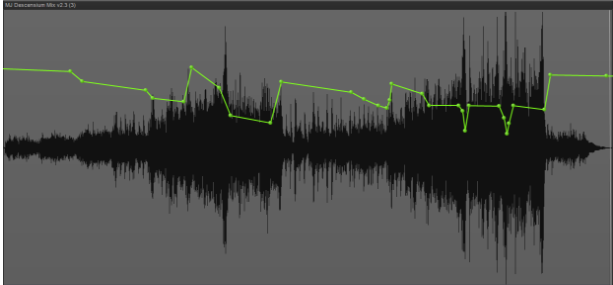
However, do not make big volume changes. You want to avoid those changes being noticeable. The image above is zoomed in, but the actual volume variation is no more than 3-5dB.
It is important that your plug-ins are loaded in a track “after” the track that loads your audio file to be mastered, so these volume changes affect the input of your plug-ins. If they are inserted in the same track, then volume changes will not make any difference in their input.
This step alone (volume automation) can make a big difference. There are subtle volume changes that will, for example, help enhance the entrance of a new section, or soften the impact of the loud moments in the limiter threshold, etc. In the Symphonic Virtual Orchestration course, we master tracks in different styles and you can see how much volume automation has been applied depending on the purpose of each track. We won’t see those here, for the sake of making this post readable.
EQ
Console Emulation and Saturation
Reverb
Multi-band stereo imager
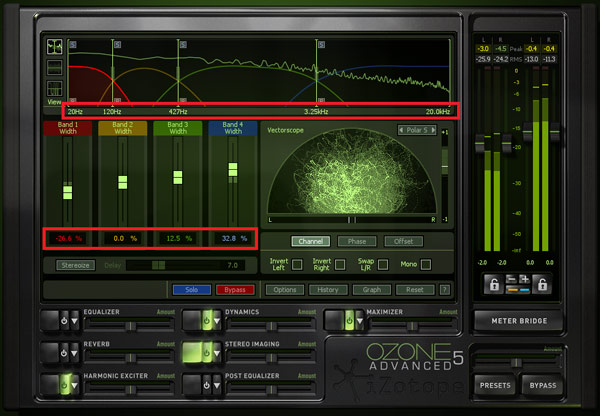
Multi-band compressor
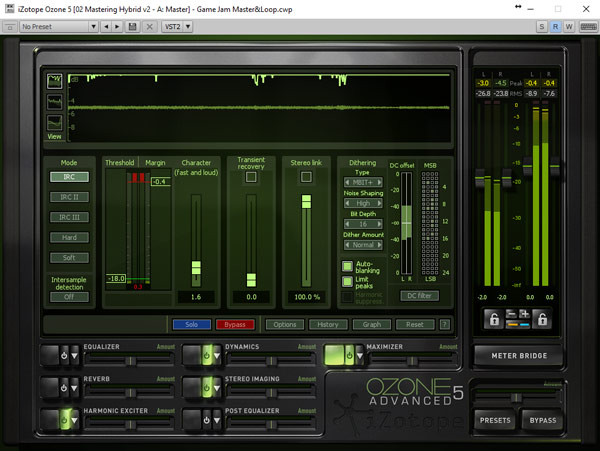
Loudness Maximizer
Last but not least
- I would love to know your opinion about the post: are you a film or video games composer? any recent scoring project? what did you learn during the process? what made you succeed in that project? how do you balance composing and networking to find new projects?
- If you think this post could help more people, can you help me reaching them sharing this post on your Twitter, Facebook, Linkedin and/or your E-mail contacts?
- Do you want to learn everything I discovered on how to produce better sounding MIDI mockups? Join to my orchestral mockup production free course below?
- Do you want to know when we publish our next post? Register your email below and you'll be the first to know.
And, if you'd like to try any of our free contents...
Get the Basic Mockup Production FREE Course
You will receive 12 emails over the span of 2 weeks. They will be relatively short, easily digestible emails that can be read in one sitting. The emails introduce the basic concepts of Orchestral Mockup Production. At the end of the course, we will have covered the basic concepts that you need to know to be able to produce professional sounding orchestral and hybrid mockups.

Click subscribe button below and get the Basic Mockup Production FREE Course.
Comments